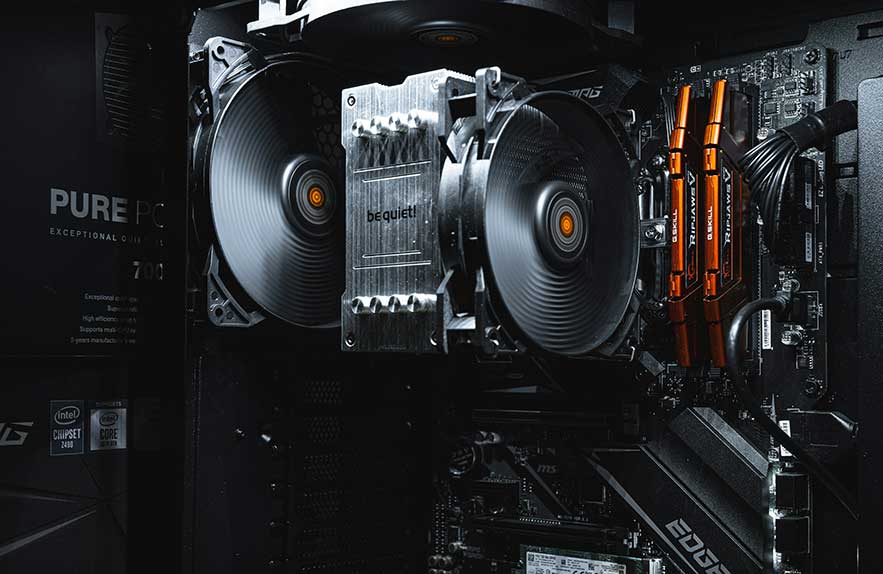
Why Knowing the Parts of a Desktop Computer Matters
Have you ever looked inside your PC and wondered what all those pieces actually do? Learning about the parts of a desktop computer is an underrated skill for anyone who uses a computer, whether it is for homework, a business, or gaming. Even if you prefer to leave major repairs to the pros, understanding what is going on under the case can help you troubleshoot small problems, save money on upgrades, and make smarter choices when buying a new device. So many people open their computer for the first time and feel lost among the wires and chips. This guide will help you turn that confusion into confidence.
Desktop computers are like puzzles, made up of different pieces that fit together to do amazing things. Each part inside your PC has a specific job—some store your files, some make graphics appear on your monitor, and some power everything up to start with. The right combination of these components affects how fast your programs run, how many files you can save, and how future-proof your computer will stay as technology changes. Understanding the parts of a desktop computer makes it much easier to talk with sales reps, tech support, or a friend giving upgrade advice.
Knowing what each part does also helps if something goes wrong. Maybe the screen stays black or your machine keeps crashing. Instead of feeling helpless, you will be able to say, “I think my RAM is the issue,” or “Maybe my power supply needs checking.” The more you know about your own computer, the easier it is to spot simple fixes or pinpoint when it is time to seek help from a professional. Plus, it is always helpful if you can explain your issue clearly when you search for a “computer part store near me” or ask for repair estimates.
Upgrading is another area where knowledge pays off. Adding more memory, swapping out a slow hard drive for a speedy SSD, or installing a new graphics card can breathe fresh life into an old device. But you need to know which parts fit your desktop’s system. When you understand the roles of the main parts of a desktop computer, you avoid wasting money on the wrong upgrades and avoid buying components that are not compatible with your setup.
This article will walk you through the essential computer parts, what each component does, and why each matters for your PC’s performance and for your everyday experience. By the end, you will know enough to confidently talk specs with a hardware engineer, make smart choices at your local store, or simply feel more in control the next time you peek inside your desktop. In the next section, we will break down the most important components and show how all the key pieces work together.
Table of Contents
- Why Knowing the Parts of a Desktop Computer Matters
- The Core Computer Components and Their Roles
- Inside vs Outside: Internal and External Parts
- Where to Buy: From DIY Kits to Computer Part Stores
- The Engineering Behind Hardware Design
- Final Overview of a Desktop Computer’s Anatomy
The Core Computer Components and Their Roles
To make sense of the parts of a desktop computer, it helps to know the key computer components that power everything behind the scenes. Each component has a role to play, and working together, they turn clicks and keystrokes into real results on your screen. Whether you are troubleshooting, planning an upgrade, or just curious, these essentials give your machine its abilities and speed.
Motherboard. The motherboard is the backbone of your PC. Every computer component, from the processor to the memory to the graphics card, connects to this big circuit board. It delivers power and sends signals so all the parts can communicate. On a technical level, the motherboard holds firm everything in the right place. When choosing a motherboard, people often look at how many ports it has, what type of RAM it supports, and if it can handle upgrades later.
CPU (Central Processing Unit). If the motherboard is the backbone, the CPU is the brain. This chip handles nearly all the thinking. Every time you open a file, watch a video, or play a game, the CPU is interpreting instructions and making calculations. Faster CPUs mean snappier performance. Some computers are built for basic browsing with simple CPUs, while gaming or workstation PCs often use multi-core, high-speed models for intense workloads.
RAM (Random Access Memory). RAM is your computer’s short-term memory. This is where your system keeps important data that it needs quickly, like a notebook full of active work. If your PC ever feels slow with lots of tabs or programs open, more RAM is usually the best upgrade. The computer component called RAM helps your CPU access programs and documents much faster than reading from a hard drive or SSD.
Storage (HDD/SSD). Permanent storage is the home for all your files, software, and even your operating system. For years, this was handled by hard disk drives (HDDs) with spinning platters. These days, solid-state drives (SSDs) are preferred because they are faster, more reliable, and help your computer boot up and load apps in seconds. Larger storage means more space for photos, videos, and games, but speed often matters even more for everyday work.
Power Supply (PSU). All these parts need a steady, reliable supply of energy. The power supply unit (PSU) converts wall electricity into just the right voltages that every other computer component uses. A good PSU is not glamorous, but it is essential for stability and safety. Poor quality power supplies are a common source of crashes, reboots, and failures, so this is one upgrade you do not want to skimp on.
Together, these core computer components form the heart of any desktop PC. Each piece is crucial, and a problem with any one item can slow down or completely halt your system. If you want to see more images and detailed explanations for each part, visit Crucial’s computer components page for a good beginner’s walkthrough.
In the next section, we will look at the difference between the parts you find inside a desktop and all the accessories you plug in on the outside. Understanding how they all connect will make setups, upgrades, and troubleshooting much easier.
Inside vs Outside: Internal and External Parts
Understanding the difference between internal and external parts of a desktop computer is key to avoid confusion, especially for beginners. When your machine is running, all the main action happens thanks to a group of internal components tucked safely inside the computer’s case. These include the motherboard, CPU, RAM, storage drives, graphics card, and cooling fans. Each internal computer component has a specific role and works in sync to power your programs and files.
The internal computer components are often what people mean when they talk about “upgrading” or “repairing” their system. Maybe your old hard drive is too slow, or you want more RAM to speed up multitasking. Changing one of these internal parts usually means opening the case, working carefully with cables and connectors, and sometimes even using a little patience to fit things together. Beginners who are just starting out will often take their machine to a repair shop for this, but step-by-step guides online make it easier than ever to do small upgrades on your own.
On the outside, you have the peripherals or accessories. These are the pieces most people use and notice every day. External parts include the monitor, keyboard, mouse, speakers, external hard drives, printers, and webcams. While they are not inside the machine, they are still a critical part of the overall computer experience. You need external devices to enter information, see results, and interact with everything inside your computer. Some gamers add specialized controllers, and designers use advanced drawing tablets, all connecting through ports, cables, or wireless technology.
The confusing part is that all external and internal parts communicate through pathways on the motherboard and a mix of USB, HDMI, DisplayPort, and audio cables or even Bluetooth. If you have ever plugged in a new keyboard or set up a dual-monitor workstation, you are taking advantage of these connections. Knowing which port is which, and what type of cable you need, can save a lot of frustration when something is not working right. Many “computer part store near me” searches are for people needing the right cable, mouse, or adapter to get all their devices working together again.
Many beginners mix up which parts can be replaced easily and which ones are permanent or specialized. Internal upgrades usually require more care and research, while replacing an external keyboard or monitor can be as simple as plugging in a new device. If you would like to see a visual breakdown of all common parts and how they connect, Computer Hope’s internal and external overview is a helpful guide for every skill level.
Now that you know the roles of both internal and external components, the next section will help you navigate where to find and purchase each one. From local shops to online outlets, choosing the right store matters whether you are repairing, upgrading, or building your first desktop.
Where to Buy: From DIY Kits to Computer Part Stores
When it comes to upgrading, fixing, or building a desktop PC, knowing where to buy your components is a huge part of the journey. Many people start their search online by typing “computer part store near me.” This is hardly surprising, since picking up a piece in person can mean same-day repairs and expert advice. However, there are many routes to getting the right computer component, and each option has its pros and cons.
Local computer part stores are favorites for hands-on help. Staff can answer questions about compatibility, offer tips for installation, and help steer you away from mismatched parts. Many shops let you compare products side-by-side, feel the weight of a power supply, or look at the label on a stick of RAM before buying. If something goes wrong, you can bring it back and get personal support. To find a reputable store near you, use resources like the Yellow Pages local directory and read customer reviews on Google or Yelp before heading out.
On the other side, online retailers have exploded in popularity for those looking to build their own PC or find rare hardware. Sites like Newegg, Amazon, or Micro Center’s online catalog let you price-compare, check user reviews, and access thousands of different parts from all the big brands. While local stores often have limited shelf space, online shops can offer the latest launches and bundle deals. One downside is waiting for shipping and sometimes having to navigate returns without face-to-face help. For beginners or first-time builders, sites like PCPartPicker help compare specs and avoid compatibility mistakes, letting you build a list and check reviews before you spend a dime.
Prebuilt desktops are another choice for people who want a functioning computer with no hassle. Stores like Best Buy, Walmart, or specialized retailers sell ready-to-go machines. You pay a bit more for the assembly and warranty, but you can unbox and start using your PC right away. This option often appeals to students, home offices, or people who do not care about tweaking every last component.
For hobbyists and those wanting a custom setup, DIY computer kits are a fun route. You order parts individually, assemble them, and choose exactly which computer components go into your machine. It can be rewarding to turn a box of parts into a working desktop, and plenty of online guides and forums are available to help if you get stuck. Just make sure to check compatibility, power requirements, and return policies before purchasing to avoid headaches down the line.
In short, whether you shop local for quick fixes, order parts remotely for a major upgrade, or go prebuilt for convenience, take time to compare options. Use reviews, search for a trusted “computer part store near me,” and do not be afraid to ask questions. In the next section, we will look at the experts—the hardware engineers—who design and test the parts you are considering for your desktop.
The Engineering Behind Hardware Design
Most people shopping for parts of a desktop computer or searching for a computer part store near me never stop to think about the engineering that makes each component possible. Every piece inside your PC, from the simplest stick of RAM to the most advanced graphics card, was once an idea on paper. Turning those ideas into a reliable product is the work of computer hardware engineering and the creative people called hardware engineers.
At its core, computer hardware engineering means designing, developing, and testing the electronic circuits that power our devices. A hardware engineer is someone who bridges the gap between science and real-world use. They research what users need, create blueprints, choose materials, and run experiments to make sure new computer components are safe, efficient, and long-lasting. For beginners, it is helpful to imagine hardware engineers sketching out a new motherboard, testing how much heat a chip produces, or solving tiny glitches that could crash a whole computer.
What makes this discipline unique is that it combines creativity with precision. Teams of engineers decide where each component sits on a physical board, figure out how all the parts will talk to each other, and make sure the final hardware will work in millions of different home or office environments. As computers keep shrinking or gaining more power, computer hardware engineers are always looking for ways to pack more performance into smaller, cooler, and more energy-efficient parts.
Much of the progress you see in new computers each year comes from advances in hardware engineering. Faster processors, slimmer laptops, silent or more powerful graphics cards, and even energy-saving designs in desktop power supplies are all the direct result of clever engineering solutions. Sometimes the improvements are obvious, like a much higher-resolution screen. Other times, they show up as longer battery life or a desktop that runs smoothly year after year, even as apps and games get bigger.
The role of a hardware engineer is not limited to big manufacturers. Many smaller companies also hire or consult with experts to create custom systems for schools, media centers, medical equipment, or research labs. The field of computer hardware engineering is vast and is constantly evolving with new challenges and inventions. For anyone who is curious about these careers or wants a behind-the-scenes look at development, the Bureau of Labor Statistics hardware engineer overview is a helpful and up-to-date resource.
By appreciating the work that goes into each computer component, you can see why choosing quality parts matters and why reliability and compatibility are never an accident. In the last section, we will wrap up the main takeaways about all the parts of a desktop computer, with a reference list that makes future upgrades or troubleshooting much simpler for everyone.
Final Overview of a Desktop Computer’s Anatomy
Understanding the parts of a desktop computer is more than just memorizing tech terms. It is about giving yourself control over your own device, from troubleshooting slowdowns to choosing the right upgrades. Knowing what each computer component does empowers you to have better conversations at the store, safer experiences online, and even more confidence if you ever decide to repair or build your own PC.
Here’s a quick-reference summary to help you remember the essentials:
- Motherboard: The main hub that connects every computer component inside your case.
- CPU: Handles nearly all processing and makes your software and games work.
- RAM: Provides quick, short-term memory for your system to multitask smoothly.
- Storage (HDD or SSD): Keeps your files, photos, and software safe for long-term use.
- Power Supply (PSU): Supplies safe, steady power to every part of your desktop.
- GPU (Graphics Card): Processes images, video, and gaming graphics.
- Cooling and Fans: Prevent overheating and keep your PC running reliably.
- External parts: Monitors, keyboards, mice, speakers, and anything you connect for use or input.
The most important advice for beginners is to start simple and ask questions along the way. If you are shopping for upgrades or need repairs, do not hesitate to visit a well-reviewed computer part store near you. Staff can often explain compatibility, diagnose issues, and help you avoid costly mistakes. Reading online guides and user reviews is also a smart move for understanding the experience of others before making any purchase.
You do not have to become a hardware engineer to enjoy the benefits of knowing your desktop inside and out. The more you learn about computer hardware and each computer component, the smoother your tech journey will be. If you want a visual refresher or see typical part layouts, Intel’s PC components guide offers diagrams and beginner-focus tips.
As technology evolves, the basics of the parts of a desktop computer remain the same. Take your time exploring, ask questions at your local shop or online, and do not be afraid to open the case and get familiar with your own system. Being informed sets you up for smarter choices, whether you are upgrading for better performance or just want a machine that lasts. Every great PC starts with understanding the essentials inside.

Georgijus
Founder of LivePCTech, Georgijus is a full-stack engineer with 16+ years of experience in hosting, DevOps, Linux/Windows systems, and backend software development.
→ Learn more about Georgijus