Why Kanban Tools Still Matter in 2025
It started on a factory floor. Back in the 1940s, Toyota introduced Kanban as a simple visual scheduling system to manage production more efficiently. Fast forward to 2025, and Kanban has become a core part of digital productivity — powering everything from agile software teams to solo freelancers. Despite newer trends and fancier dashboards, Kanban tools continue to thrive for one big reason: they just work.
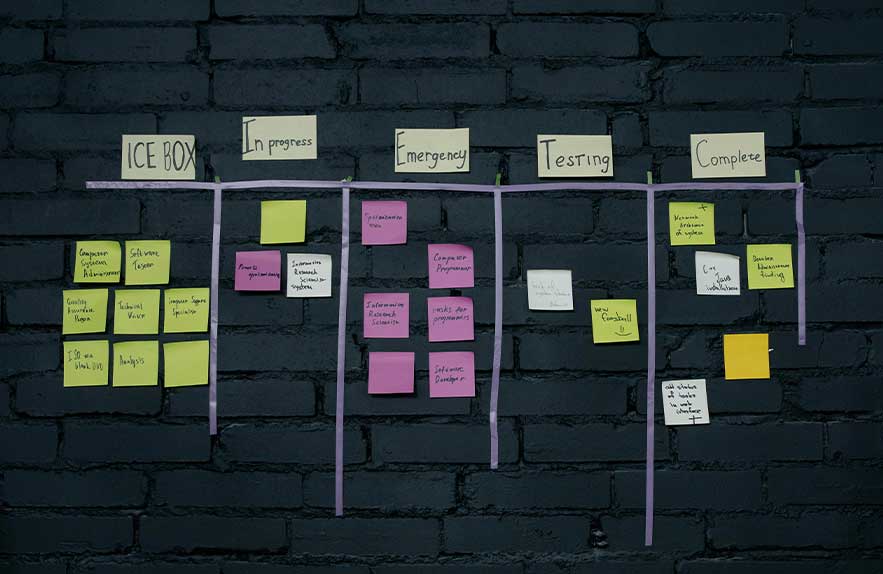
At its core, a Kanban system is visual. Tasks live on cards. Cards move across columns. You can see everything at a glance — what’s being worked on, what’s blocked, and what’s done. It’s this visual clarity that makes Kanban so effective. Whether you’re using a physical board or a digital kanban app, you get instant visibility without digging through lists or toggling filters.
In today’s fast-paced work culture, teams don’t just want to plan — they want to adapt. That’s where Kanban still shines. With its focus on limiting work-in-progress (WIP) and promoting smooth task flow, it’s ideal for collaborative environments where priorities shift quickly. Whether you’re part of a 10-person dev team or managing client work solo, modern kanban tools make that system scalable, flexible, and easy to update in real time.
It’s also important to understand the difference between a full Kanban board and a general project dashboard. Dashboards show you data. Kanban boards show you flow — and that’s a major advantage when juggling multiple deadlines, tasks, or contributors. The best kanban app options today blend the two, giving you both structure and adaptability.
So while new tools come and go, Kanban sticks around — evolving with teams, scaling with projects, and remaining one of the simplest and smartest ways to manage work in motion. If you’re streamlining your team’s workflow with Kanban boards, don’t miss our detailed guide to the best productivity software for Windows in 2025 — covering everything from project management to writing tools.
What to Look for in a Kanban Tool
Not all kanban tools are built the same. Some focus on simplicity, while others come packed with features that rival full project management suites. So how do you choose the right one? It starts with knowing what to look for — not just in terms of features, but how well the tool fits your team’s style, size, and workflow.
At a minimum, every solid Kanban board should support drag-and-drop cards, column customization, and labels. But to really level up, look for extras like swimlanes (to group tasks by type or priority), WIP limits (to avoid overload), and automation tools that save time. The best kanban board tools also offer integrations with apps your team already uses — Slack, Google Drive, GitHub, or even time trackers.
Different users also value different things. A small creative team might want a sleek interface and built-in file attachments. A software dev team? They’ll need robust issue tracking, version history, and tight Git integration. Freelancers may lean toward simplicity, while product managers look for dashboards, dependencies, and analytics. That’s why the right kanban app for you isn’t just about features — it’s about fit.
There are also times when a kanban board tool outperforms a regular task list. If you’re managing moving parts — design reviews, sprint planning, editorial pipelines — a Kanban view keeps everything visible, trackable, and flowing. Traditional lists just don’t offer that same clarity, especially for team-based work.
In the next part, we’ll look at ten of the most popular options — both free and paid — so you can find the kanban tools that match your needs. Whether you’re just starting or scaling a team, there’s something in this lineup that’ll help you move smarter.
Best Free Kanban Tools for Beginners & Small Teams
Not every team needs an enterprise-level platform to stay organized. In fact, if you’re just getting started, the best way to dive into visual task management is with a free kanban board. Luckily, there are plenty of free tools that deliver solid features without the paywall — perfect for solo workers, students, or small teams who just want to get moving.
Trello is easily the most beginner-friendly of them all. It’s visual, fast, and intuitive — just drag and drop cards between columns. Trello shines when you want a simple board that doesn’t require a learning curve. You can add checklists, due dates, labels, and even power-ups (like calendar views) to stretch its functionality. For personal workflows or team brainstorming, it’s a near-perfect kanban app.
ClickUp is a great choice for teams who want more flexibility. While it’s technically a full project management suite, it includes a powerful free kanban board mode with drag-and-drop cards, status workflows, and integrations. What sets ClickUp apart is that you can switch between views — list, calendar, timeline, or Kanban — all in one place. That makes it ideal for teams who are still figuring out their preferred working style.
MeisterTask brings automation into the mix. It has a clean, modern interface and allows you to create automations within your Kanban workflow — like auto-assigning tasks or updating statuses when cards move. For visual thinkers who want to keep it streamlined without sacrificing power, MeisterTask is worth a look.
KanbanFlow is a great pick if time tracking is part of your workflow. It combines a standard Kanban layout with Pomodoro timers, task estimates, and analytics. This makes it especially useful for freelancers or productivity-focused teams that want to measure how work flows — not just what’s on the board.
Finally, if you’re looking for something super lightweight (or open-source), TaskBoard and Planka are both solid options. These are self-hosted tools with no account required — just install them and start building boards. They’re ideal for developers or anyone who prefers offline or local-first tools.
All of these platforms offer a free kanban board experience with just enough features to keep small teams organized. If you’re new to Kanban or just want something that works out of the box, these are the best places to start.
Top Paid Kanban Platforms for Teams & Enterprises
When your projects scale, your tools need to grow with you. While free tools are great for getting started, paid kanban project management tool platforms offer deeper functionality — from advanced reporting to team-wide automations. These platforms are ideal for growing teams, tech companies, agencies, or anyone managing complex workflows across multiple departments.
Monday.com is one of the most customizable options out there. You can build Kanban boards with dynamic columns, automated triggers, and dependencies between tasks. It also offers time tracking, Gantt charts, and dashboard views, making it a hybrid between a Kanban system and a full project operating system. If your team needs structure plus visual freedom, Monday delivers.
Asana blends Kanban with timeline and calendar views, which makes it especially useful for marketing teams, product managers, and agencies. You can switch between Kanban boards and Gantt-style project timelines without losing your data. With features like milestones, forms, and workload balancing, it’s more than just a kanban app — it’s a full collaboration tool.
Jira remains the gold standard for software development teams. Its Kanban boards are built with agile workflows in mind, including backlog grooming, sprints, and deep issue tracking. It’s powerful, but has a steeper learning curve — best for dev teams who need granular control over user stories, bugs, and versioning.
Notion may not look like a Kanban tool at first, but its board view is surprisingly capable. You can tag cards, link databases, and build project wikis in the same workspace. It’s great for creative teams or knowledge-driven environments where task tracking and documentation need to live side by side.
Two rising stars — Linear and ZenHub — are built specifically for fast-moving dev teams. Linear offers a lightning-fast interface with GitHub and GitLab integration, while ZenHub plugs directly into GitHub issues. Both are ideal if your Kanban workflow lives inside your codebase.
These paid platforms offer far more than basic task boards. If you’re juggling multiple stakeholders, tracking KPIs, or handling high-volume workflows, investing in a serious kanban project management tool can bring clarity, accountability, and speed to your entire team.
Kanban App vs. Full Project Management Suite
Not every tool with a Kanban board is a true kanban app — and not every project management suite is overkill. The difference comes down to how deeply the Kanban system is integrated into the tool and whether it’s the main feature or just one of many views. If you’ve ever wondered whether you need a simple Kanban board or a full-blown platform, this part will help you sort it out.
A dedicated kanban app like Trello or KanbanFlow is designed specifically around card-based task management. These tools are streamlined, easy to learn, and focus solely on moving tasks through stages. They’re perfect for individuals, small teams, or anyone who wants visual task clarity without a ton of extras. You can usually start fast and customize as needed — columns, labels, WIP limits, and checklists are all standard.
In contrast, full project management platforms — like ClickUp, Monday.com, or Asana — treat Kanban as one of many tools. You might also get Gantt charts, timelines, list views, calendars, dependencies, or workload tracking. These systems are great when you’re juggling complex workflows, collaborating with multiple teams, or reporting to stakeholders. The Kanban board is still there — but it’s just one piece of a much larger toolkit.
So how do you choose? If you’re a solo creator managing content, client tasks, or personal projects, a focused kanban app might be all you need. If you’re on a product team handling sprints, launches, and cross-functional dependencies, a full suite with Kanban built in is likely a better match.
In short: go lean when you want clarity. Go full-suite when you need coordination. And don’t be afraid to test both — many tools today let you switch between views so you’re never stuck in one system.
Common Mistakes to Avoid with Kanban Systems
Kanban is simple — but simple doesn’t always mean foolproof. Whether you’re using a lightweight kanban app or a full project management suite with a board view, there are a few common pitfalls that can quietly kill your workflow. These mistakes often lead to cluttered boards, missed deadlines, or team confusion. The good news? They’re easy to fix once you know what to watch for.
1. Too many columns. It’s tempting to create a column for every little step — “Draft,” “Needs Review,” “Team Feedback,” “Edits,” “Final Edits,” “Ready to Schedule,” “Published.” Suddenly, your board is 12 columns wide and nobody knows where the real progress is happening. Stick to just a few key stages: To Do, In Progress, Review, and Done. Simple wins.
2. No clear DONE criteria. What does “done” actually mean for your team? If your final column isn’t clearly defined, tasks linger. Decide ahead of time: is “Done” when the work is shipped, reviewed, delivered to the client, or archived? Every kanban board tool should make this status crystal clear.
3. Overloading tasks with no WIP limits. Kanban is built around limiting work in progress. Without that, people end up juggling five things and finishing none of them. Use your tool’s WIP limit feature to cap how many tasks can be in the “In Progress” stage. It keeps focus sharp and flow steady.
4. Poor prioritization. Just because all cards look the same doesn’t mean they carry the same weight. Use labels, color codes, or swimlanes to highlight priority items. Whether you’re using a basic free kanban board or an enterprise-level tool, visibility matters.
Even the best kanban tools won’t fix a broken process — but they can absolutely support a strong one. Avoiding these mistakes helps your team stay focused, track progress clearly, and move tasks across the board with real momentum.
How to Choose the Right Kanban Tool for You
With so many kanban tools out there, the best choice really comes down to your goals, your team size, and how you like to work. The right pick for a solo freelancer will look totally different from what a fast-moving dev team needs. That’s why choosing a Kanban platform should start with your workflow — not just the features on a pricing page.
If you’re working alone or just dipping your toes into Kanban, go with a free kanban board like Trello, MeisterTask, or KanbanFlow. These tools are clean, intuitive, and give you all the basics without the overwhelm. Perfect for content creators, students, small projects, or visual thinkers who just want a simple way to stay organized.
Small teams — especially remote ones — often benefit from something more flexible. Tools like ClickUp or Asana combine a kanban board tool with other views like lists, calendars, and timelines. If your team likes to switch perspectives, assign tasks, and track workload, these hybrid platforms make it easier to stay aligned without leaving the board behind.
Technical teams, especially developers, may need deeper integrations. In that case, platforms like Jira, ZenHub, or Linear are built for your flow. These tools treat the board as part of a bigger system — integrating with GitHub, tracking sprints, and helping teams manage issues at scale. If your Kanban board has to talk to your codebase, that’s where these tools shine.
Don’t stress about picking the “perfect” tool right away. The smartest move? Try at least 2–3 different kanban app options for a week. Use them in real workflows, not just as demos. You’ll learn quickly which ones fit your habits, support your team’s pace, and actually help you get things done.
Comparison Matrix: Top 10 Kanban Tools
Still deciding which kanban tools to test? Here’s a side-by-side breakdown of the top 10 options covered above — from simple free kanban board platforms to advanced kanban project management tool suites. This matrix makes it easier to match features to your workflow so you don’t waste time on the wrong tool.
| Tool | Pricing | Best For | Key Features | Notable Limitations |
|---|---|---|---|---|
| Trello | Free + Paid | Beginners, solo users | Simple Kanban, Power-Ups, drag & drop | Limited views in free plan |
| ClickUp | Free + Paid | Teams, hybrid workflows | Multi-view (list, board, timeline), automations | Can feel overwhelming at first |
| MeisterTask | Free + Paid | Creative teams, automation lovers | Clean interface, built-in automation | Limited templates |
| KanbanFlow | Free + Paid | Time tracking, solo work | Pomodoro timer, analytics, sub-tasks | Outdated UI |
| TaskBoard | Free (self-hosted) | Offline users, developers | Local install, no account needed | Manual setup, no cloud features |
| Monday.com | Paid (Free trial) | Large teams, custom workflows | Custom columns, dashboards, automation | Paid-only Kanban features |
| Asana | Free + Paid | Marketing & product teams | Kanban + Gantt hybrid, timeline view | Limited reporting unless paid |
| Jira | Free + Paid | Developers, Agile teams | Issue tracking, sprints, Git integration | Steep learning curve |
| Notion | Free + Paid | Creative teams, documentation | Board + database, team wiki features | No native time tracking |
| Linear | Free + Paid | Fast dev teams, GitHub users | Speed, keyboard-driven, beautiful UI | Limited outside dev workflows |
Whether you want simplicity, dev-specific features, or a flexible all-in-one platform, there’s a kanban board tool here to match your workflow. Try a few hands-on — even a short test drive can reveal what fits your team’s pace and priorities.
Frequently Asked Questions
What is the best Kanban tool for beginners?
Trello is often considered the best kanban app for beginners. It’s easy to learn, free to start, and supports drag-and-drop cards with labels, checklists, and due dates. If you’re new to Kanban boards, Trello offers the right balance of simplicity and flexibility to help you get up and running quickly.
Can I use a free Kanban board for my team?
Yes, many free kanban board platforms work well for small teams. Tools like ClickUp, MeisterTask, and KanbanFlow all offer collaborative features like task assignments, team boards, and integrations. Just make sure to check any user or project limits in the free tier if your team is growing.
What’s the difference between Kanban and full project management tools?
A dedicated kanban board tool focuses mainly on visual task flow — moving cards from To Do to Done. Full project management tools like Asana or Monday.com include Kanban views but also offer calendars, timelines, dashboards, and reporting. If you need more than just a board, a full platform might be a better fit.
Is Kanban suitable for developers?
Absolutely. Many developers use a kanban project management tool like Jira, Linear, or ZenHub to manage code issues, sprints, and bug tracking. These tools often integrate directly with GitHub or GitLab, making it easy to track code-related tasks within the same workflow.
Do Kanban apps work offline?
Most browser-based kanban tools require an internet connection, but some offline options do exist. Self-hosted tools like TaskBoard or Planka can run locally, while apps like Trello and Notion offer limited offline functionality if you use their desktop versions. For full offline use, look for open-source Kanban apps or tools with desktop installers.

Georgijus
Founder of LivePCTech, Georgijus is a full-stack engineer with 16+ years of experience in hosting, DevOps, Linux/Windows systems, and backend software development.
→ Learn more about Georgijus